

4.9
(150+ reviews)
Shopify Variant Images
Show only the images that belong to the selected variant.
* Variant image filtering is a feature of the GG Product Page Image Slider app
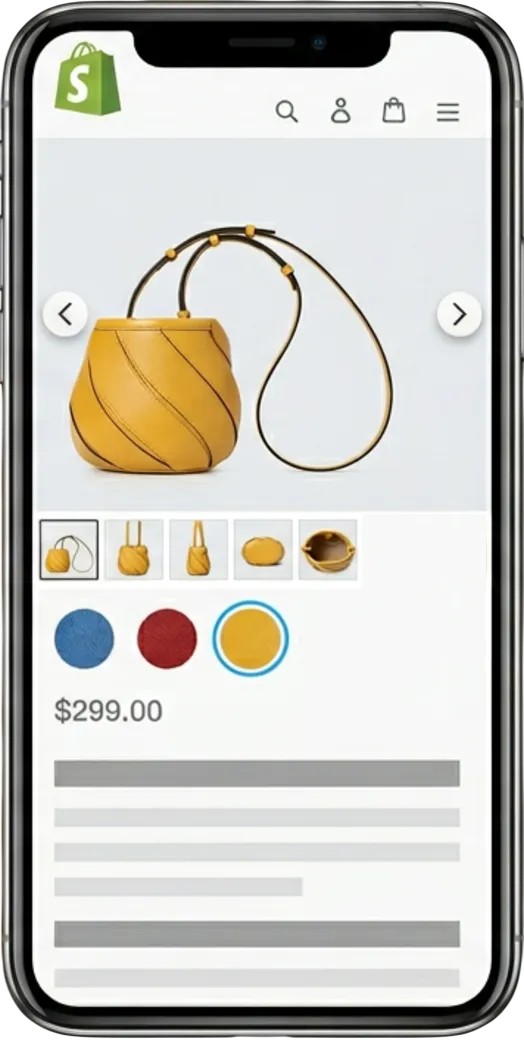
Show the right images for every variant
Shopify natively lets you assign exactly one image to a variant. But your gallery still shows every product photo at once. If you sell a shirt in five colors with four photos each, your customer gets a twenty-image wall. They click “Red” and still have to scroll past the blue, green, and black photos to find what they’re looking for.
The app changes how the gallery works. It makes Shopify change image based on variant selection, so when someone picks a color or size, the gallery switches to show only the photos for that option. Images for other variants are hidden. Customers see exactly what they’re buying.
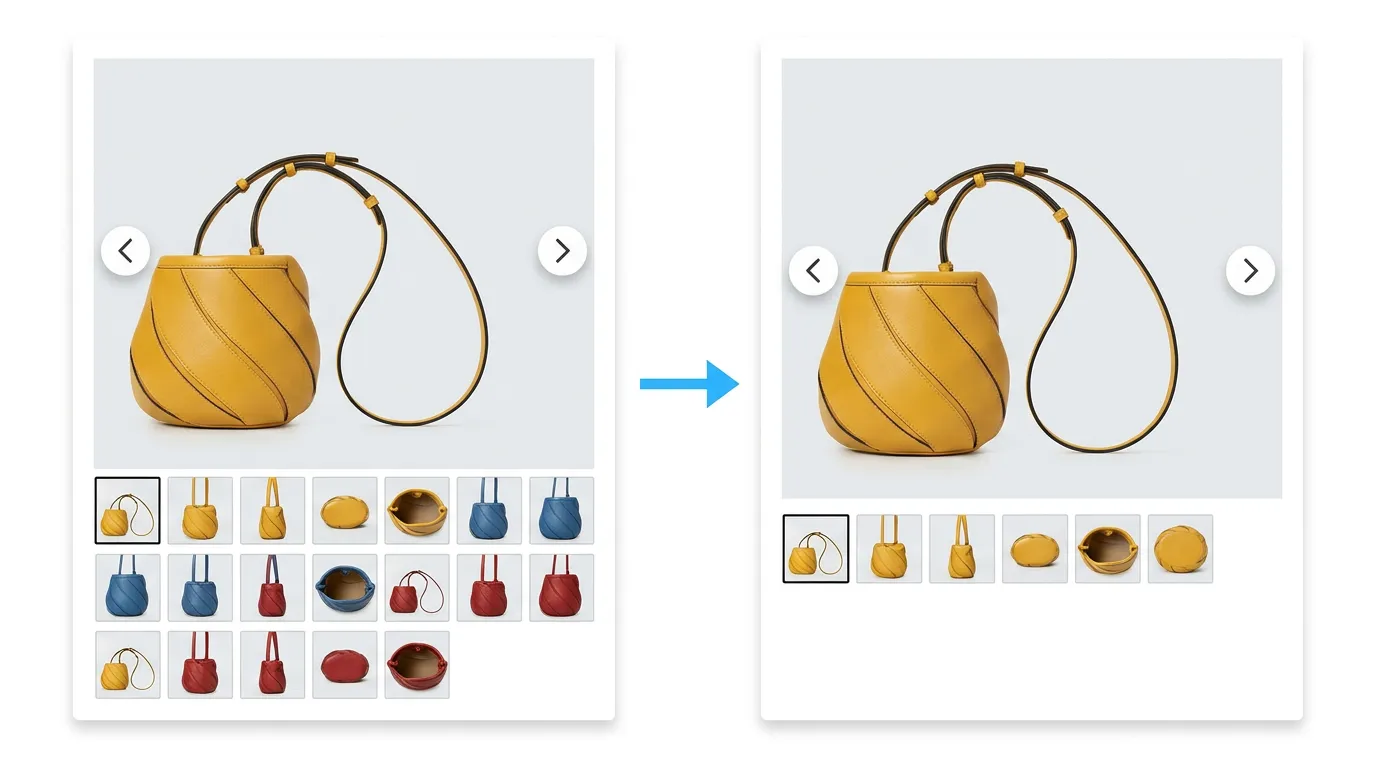
Clean up your product gallery
A product with a lot of variants usually means a bloated gallery. Fifty images stacked together is overwhelming, and customers lose track of which photos match their selection. Variant image filtering removes the clutter. The app makes Shopify only show variant images that match the customer’s selection. Every other variant’s photos are hidden. The page stays focused because it only shows what’s relevant right now.
| Native Shopify | With the app | |
|---|---|---|
| Images per variant | 1 | Unlimited |
| Gallery filtering | None | Automatic |
| Irrelevant images | Always visible | Hidden |
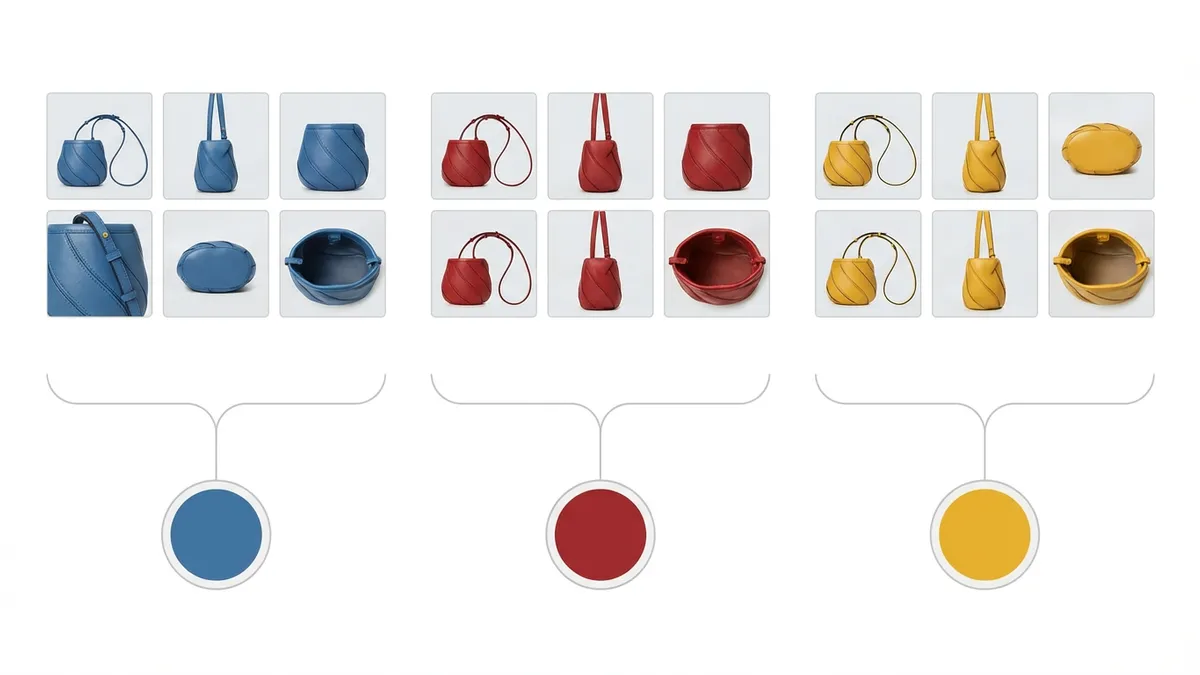
Groups images automatically
Shopify limits you to one image per variant, but the multiple images per variant Shopify merchants need (the front, back, and detail shots) are what the app provides. Our app groups these images for you automatically based on how you order them in Shopify. You assign the first image to a variant, and the app automatically pulls in the following images until it hits the next assigned variant. It’s a common-sense setup you likely already follow.
Because it relies on your existing image order, you don’t have to configure anything product by product. It works instantly whether you have ten products or a thousand. If a few images are out of order, our support team will help you spot them and put them in the right place.
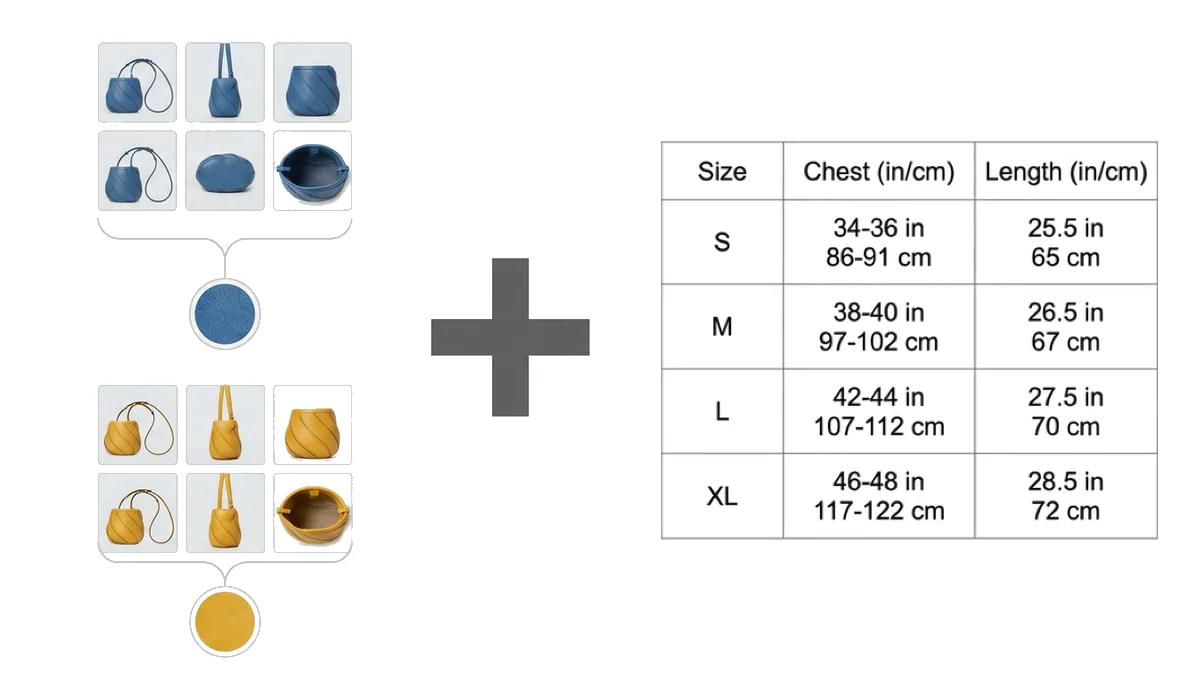
Keep common images visible across all variants
Not every image belongs to a specific color or size. You probably have size charts, lifestyle shots, or brand guarantees that every customer needs to see. The app handles this automatically.
Any images you place at the very beginning of your Shopify media list (before the first assigned variant image) are treated as common images. The app automatically appends these common images to the end of every variant’s gallery. This gives you the flexibility to filter the product-specific photos while keeping your shared assets visible to everyone.
How to set up variant images
You can get variant filtering running in a few minutes without touching your theme code.
- Install the app: Add the GG Product Page Image Slider from the Shopify App Store. It uses the product media you already uploaded.
- Check your image order: In your Shopify admin, make sure the first image of a variant is assigned to it. The app automatically groups any unassigned images that follow it into that same variant. Put any shared images (like size charts) at the very top.
- Enable the toggle: Flip the variant image filtering switch in your settings. Your gallery now automatically hides irrelevant images when a customer selects a variant.

No per-product setup required
Because the app reads your existing image order, you don’t have to go into each product and configure groups manually. Turn on the variant filtering toggle once, and it works across your entire catalog — whether you have 100 images or 1,000 products.
Watch how it works
See exactly how to group your images and flip the switch. You can go from a cluttered default gallery to clean, variant-specific images in under a minute.
What merchants are saying
I could not be more pleased with our product media with the GG Product Page Image Slider. It now has exactly the experience that I was after including setup and size of images, hiding variants when not selected and a beautiful, calm transition. The app is straightforward to configure and the support team have been superb, making tweaks to get it just right for our page! special shout out to Nikolay here!!
The GG Product Page Slider & Gallery has made a world of difference to my store. It is hard to find a product image slider that works well with variants, like color for clothing. Support is awesome! My questions were answered fast and clear.
Wonderful app that saved my live since the theme gallery I was using does not support basic features. Small spacing issue was solved promptly by Nikolay. In addition, I am using the included variant image feature that saves me money as I could replace another app that charged double the price. Win-Win.
Really nice app that works as intended, has nice customization options and doesn't seem to negatively impact page load times at all. Additionally, in a few instances when some slight tweaks or customizations were needed, the support team was super responsive and quickly made the needed updates. Thanks Gigilabs team for a great app and great support!
* All reviews are verified and visible on the Shopify App Store.
Frequently asked questions
- Does variant image filtering work with color swatches?
- Yes. Shopify color swatch image change is handled automatically — the gallery listens for variant changes from any source. It works with Shopify's native dropdowns, custom theme pickers, and third-party apps like Variant Swatch King or Globo. When a customer clicks a swatch, the gallery immediately updates.
- How many images can I assign to each variant?
- As many as you want. There is no limit. The app groups images automatically based on their order in your Shopify admin — see the step-by-step variant images setup guide for the full walkthrough. You assign the first image to a variant, and the app includes all the following images until it hits the next assigned variant.
- Does it work with my Shopify theme?
- Yes. The variant filtering feature works seamlessly on almost all Shopify themes by default. Our app relies on the variant ID parameter in the page URL to detect changes, which is standard Shopify behavior. If you have a custom theme that doesn't update the URL when a variant is selected, we highly recommend fixing that — not just for our app, but because customers won't be able to copy and share links to specific variants. Once your theme follows that standard convention, the gallery filtering works perfectly.
- Does variant image filtering affect page load speed?
- No. The filtering happens instantly in the browser. The app itself uses responsive image sizing and lazy loading, so it only requests the images your customer is actually looking at.
- What happens to images that are not assigned to any variant?
- It depends on where they are in your Shopify media list. If they are at the very beginning (before the first assigned variant image), they are treated as 'common images' and are appended to every variant's gallery. If they are placed after an assigned variant image, they are automatically grouped into that variant.
- Do I need to re-upload my product images?
- No. The app uses the media already attached to your products. As long as your images are ordered logically in Shopify (the variant's assigned image followed by its other angles), the app groups them automatically.
- Does variant filtering work for videos and 3D models?
- Yes. The filtering applies to all media types uniformly. If you have a product video showing a specific color in the light, or a 3D model of a particular style, it will only appear in the gallery when that specific variant is selected.
- Does zoom work with variant-filtered images?
- Yes. The magnifier and lightbox zoom work seamlessly with variant filtering — when a customer selects a variant, the filtered images stay fully zoomable. For the sharpest zoom result, upload the largest files you have; our Shopify product image size guide covers the recommended dimensions.
- Can I just scroll to the variant image instead of hiding the others?
- Yes. If you prefer to keep your entire gallery visible, you can use the default behavior. Instead of hiding unselected variants, the gallery will simply scroll or slide to the correct image when a customer makes a selection.
- Is variant image filtering available on the free plan?
- Variant image filtering is a PRO plan feature. You can test it out completely risk-free during the 7-day free trial to see exactly how it cleans up your product pages before committing.